Arbaint
ORDER TAGS FOR SHOPIFY

Tag Shopify orders using rules your team sets.

Choose the order checks your team repeats. When an order matches, Order Tags adds your tags and records which conditions passed.

One free rule Rules you can adjust Review every match
Order Tags • Example evaluation
Example order #10428

$186 · US · Shopify Payments · Returning customer

2 tags matched
High-value priority Matched
Order total at least $150 AND shipping country equals US
Repeat buyer Matched
Customer placed at least 2 orders in the last 30 days
Evaluation details
Both rules matched. Their tags are added to the order and recorded in Activity.
Order conditions

Match totals, shipping, payment, fulfillment, products, or discounts.

Customer history

Use first-order status and recent order count or spend in your rules.

Multiple rules

Let each order match more than one rule and receive its matching tags.

Visible activity

Review tagged and skipped orders in the app.

What it does

Set the conditions for each tagging rule.

Combine Shopify order data in rules, then review what happened to each order in the activity log.

Rule-based order tagging

Combine conditions in a rule and enable or disable it as your workflow changes.

Rich targeting conditions

Tag by order total, shipping country, payment gateway, product title, product tags, first order status, recent customer activity, and more.

Activity log

Review which orders were tagged or skipped, with the rule behind each result.

Flexible rule logic

Combine AND conditions in a scenario and add OR scenarios for alternative ways to qualify.

Inside Order Tags

Build it. Apply it. See what happened.

See the rule builder, tag settings, and activity detail from the app.

01 · Build rules

Match one path—or give an order alternatives.

Combine conditions with AND inside a scenario, then add OR scenarios for other ways an order can qualify.

  • Use order, product, shipping, payment, and customer signals
  • Combine conditions in a clear rule builder
  • Turn a rule on or off as your workflow changes
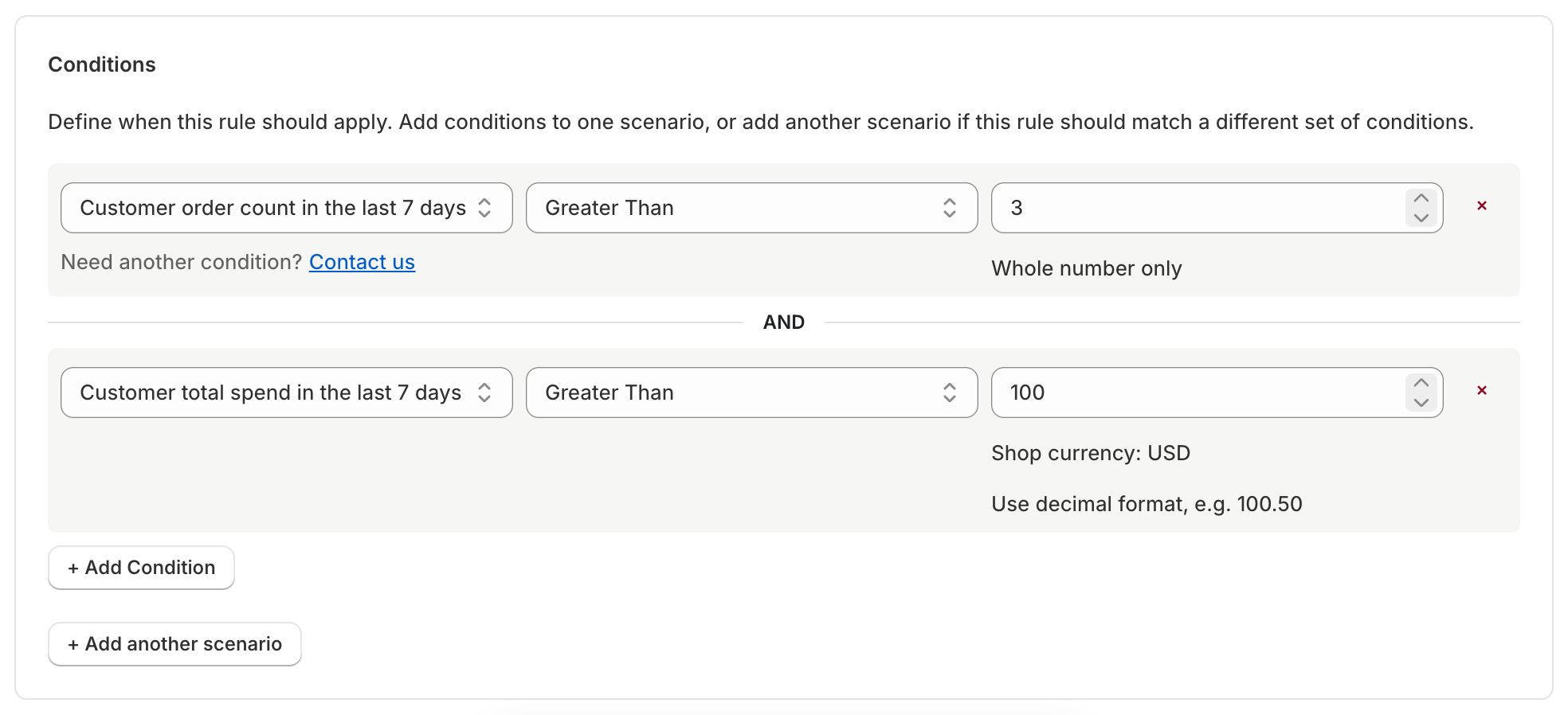
Order Tags app rule builder with configurable order conditions
02 · Apply tags

Give each matching order the labels your team uses.

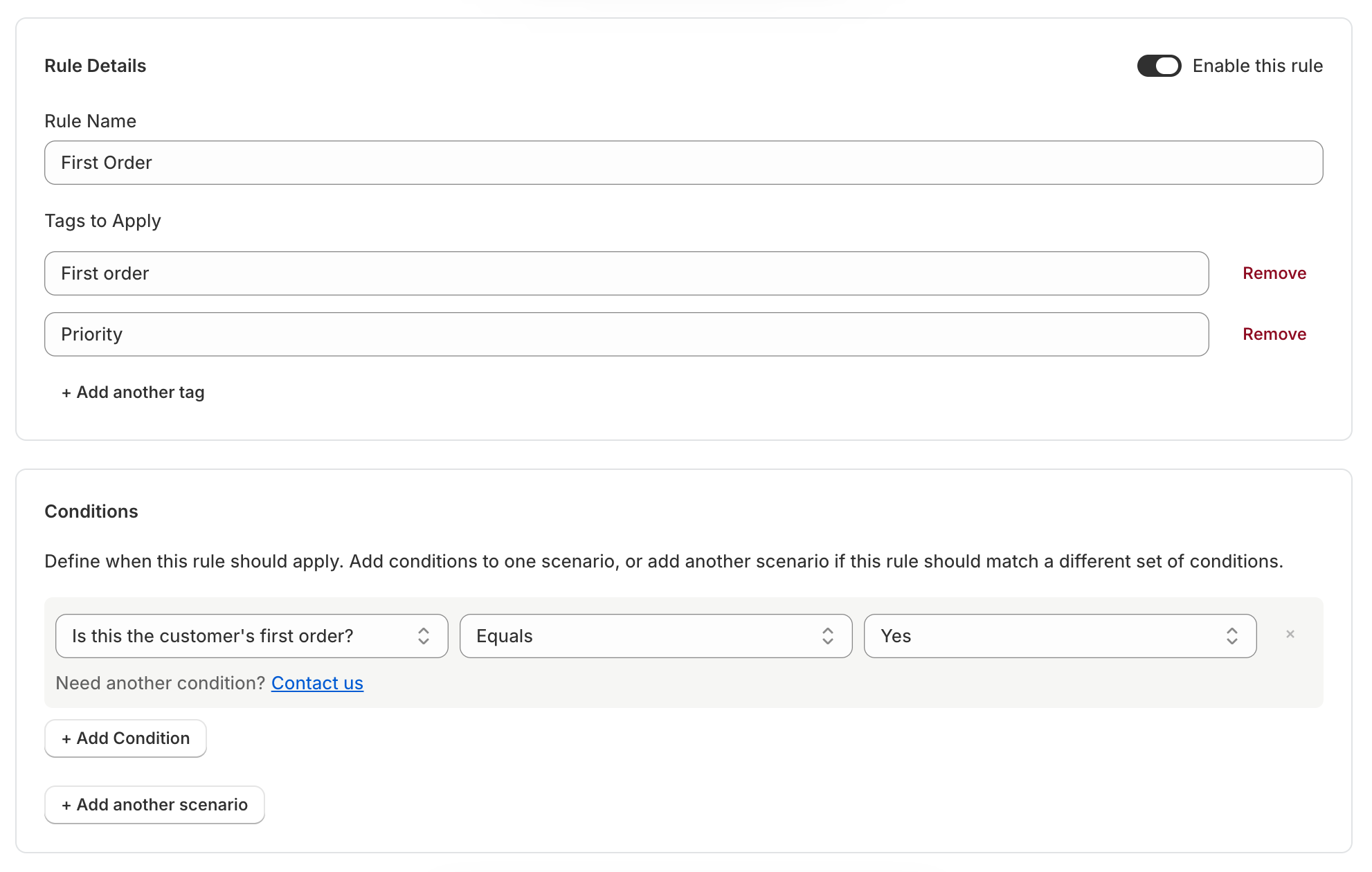
Add multiple tags to a rule so Shopify orders arrive labeled for the work that follows—such as priority handling, customer follow-up, or a fulfillment check.

  • Keep tags tied to the rule that applies them
  • Use multiple tags for one matching workflow
  • Available on Basic and Unlimited plans
Order Tags rule settings with multiple tags configured
03 · Review activity

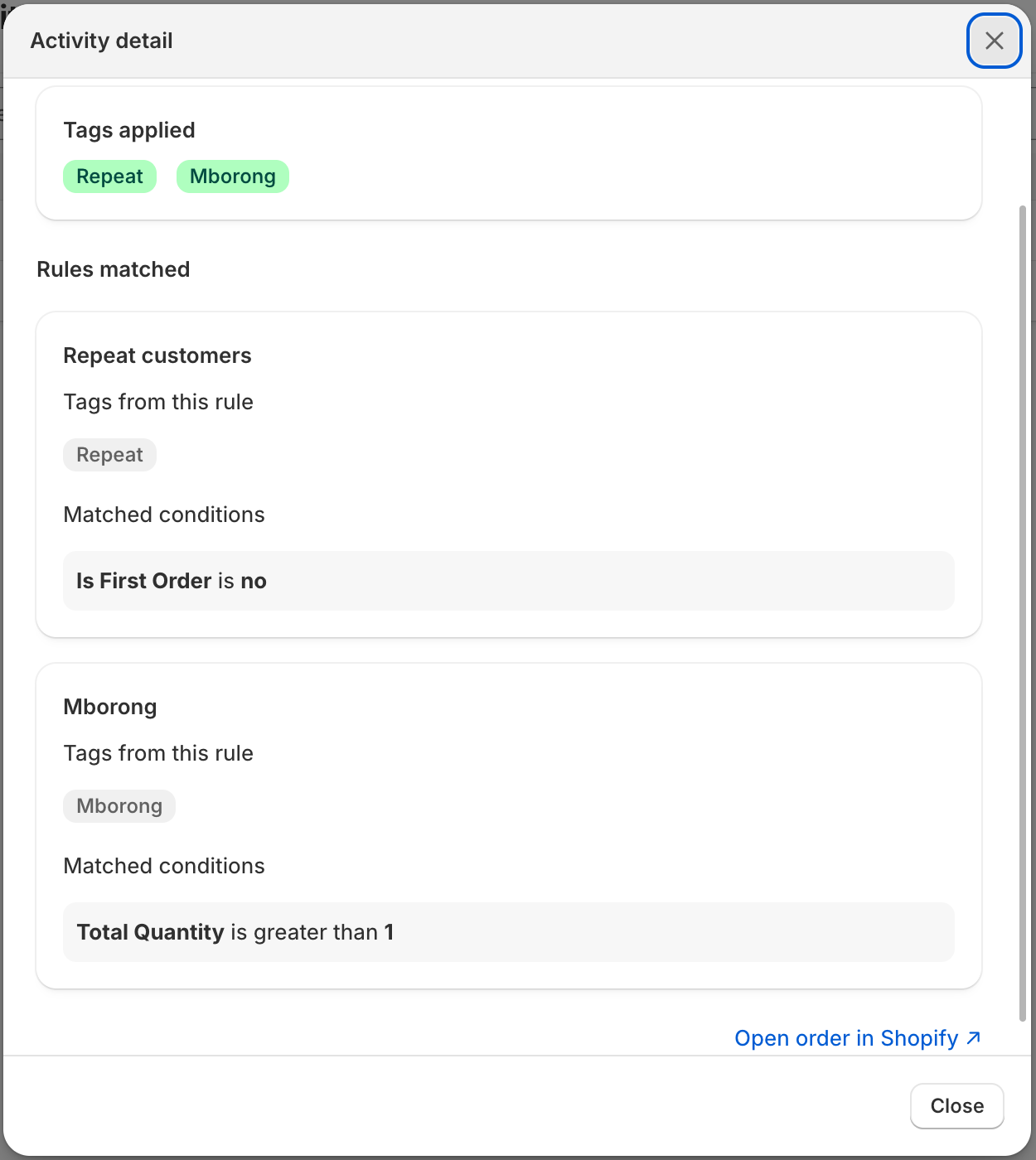
See which rules matched and which tags were added.

Use the activity log to inspect a processed order, see its applied tags, and review the conditions behind each rule match.

  • Review rule-by-rule match details
  • See the tags recorded for the order
  • Search activity to find an order to inspect
Order Tags activity detail showing order evaluation and applied tags
Use cases

Turn common order checks into automatic tags.

Choose the order signals that match the way your team handles fulfillment, customer care, and review.

Prioritize high-value orders

Match an order total and shipping region, then add a priority tag for your team.

Tag orders by payment status

Use Shopify payment status to apply tags for follow-up, reconciliation, or refund workflows.

Recognize returning customers

Use first-order status or recent order activity to distinguish customer workflows.

Route product-specific orders

Match product title, SKU, vendor, product tags, or metafields to organize fulfillment.

Supported Rules

Build rules from the data already in your store.

Choose from order fields, line items, product details, and customer history. Some product and history checks use Shopify data fetched when a rule needs it.

Order signals

Order total, subtotal, shipping price, discount total, line item count, total quantity, order weight, currency, notes, and existing order tags.

Shipping and payment signals

Shipping country, province, city, shipping method, payment gateway, financial status, and fulfillment status.

Product signals

Product title, SKU, vendor, variant, product type, product tags, and product metafields for more tailored catalog-based automation.

Customer signals

First order status, customer behavior in the last 7, 14, or 30 days, plus recent order count and spend patterns.

Store workflow signals

Order source and discount code checks for stores that need fulfillment, retention, and review workflows to stay organized.

Pricing

Plans based on the number of rules you need.

Start free with one rule and up to 30 orders per month. Paid plans remove the monthly order limit and add room for more rules.

For one workflow

Free

$0 / month

For stores starting with a single tagging rule.

  • 1 automation rule
  • Up to 30 orders per month
  • Automatic order tagging
  • Basic conditions
  • Email support
For larger workflows

Unlimited

$14.99 / month

For stores that need unlimited rules and monthly orders.

  • Unlimited automation rules
  • Unlimited monthly orders
  • Advanced conditions
  • Multiple tags per rule
  • Real-time order processing
  • Priority processing
  • Priority support
FAQ

Frequently asked questions

Is this overkill for a smaller store?

No. Even smaller merchants often have 1 or 2 repeated order checks that should not stay manual forever.

Do I need a developer?

No. The app is meant for merchant and ops workflows, not custom development projects.

What happens when an order matches multiple rules?

Each active rule is checked against the order on its own. If several rules match, Order Tags can apply tags from all of them. Activity records each match, so your team can see which rules contributed tags to the order. For example, an order can receive a priority tag and a product-specific tag, with each result linked to its rule.

Can I run rules on an existing order?

Yes. Open the order in Shopify Admin and choose Run order tags from the order actions menu. Order Tags checks that order against your active rules and records the result in Activity. It only runs on the order you select; it doesn’t scan older orders automatically.

How do AND and OR scenarios work?

Conditions in one scenario use AND. Add another scenario to let an order match an alternative set of conditions.

Can I pause a rule without deleting it?

Yes. Turn the rule off from the Rules page, then turn it back on whenever you need it.

What happens if I reach my plan limit?

Your plan’s monthly order allowance applies to automatic processing of new orders. If you reach it, new orders are skipped until the allowance resets or you upgrade. You can still run rules on an order you select in Shopify Admin.

Why do some product rules need Shopify data?

Shopify order updates don’t include every product tag or metafield. The app fetches those details when an active rule needs them.

Which order details can I use?

Use order, shipping, payment, product, discount, and customer history fields. Available operators depend on the field.

What is included in the Free plan?

The Free plan includes one automation rule and up to 30 orders per month. Upgrade when your store needs more rules or monthly order capacity.

ORDER TAGS

Put your order rules to work.

Choose the plan that fits your store and keep the outcomes visible in your activity log.